
Sponsors




Relink a Photo It Says Is Missing?
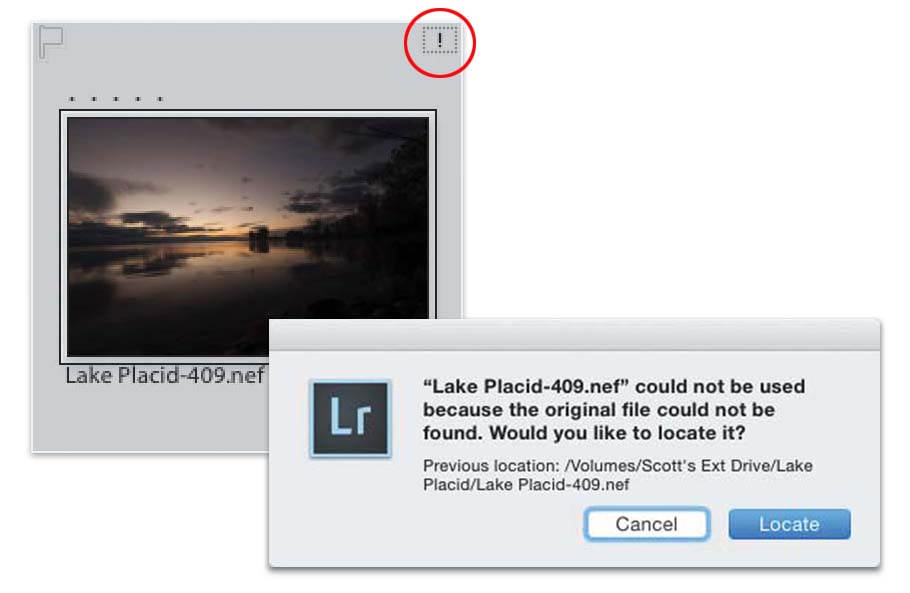
If you see an exclamation point in a little dotted rectangle in the top-right corner of a thumbnail cell, it means Lightroom has lost the link to that original image (which means you moved the image, or its folder, or both, to a different location, or it was on an external hard drive and that hard drive isn’t connected). So, just click on that little exclamation point and it brings up the warning dialog you see above, letting you know the last known location of that photo. Obviously, it’s not there now or you wouldn’t have this “lost original” problem, but this is easy to fix: just click the Locate button, then navigate to where the original photo actually is now, click on the image, click the Select button, and the problem’s fixed. If the missing original is on an external drive, and you haven’t really moved the file on that drive, the drive’s just not plugged in, well…go plug it in, and problem solved.