
Sponsors




Create an Album of My Best Photos?
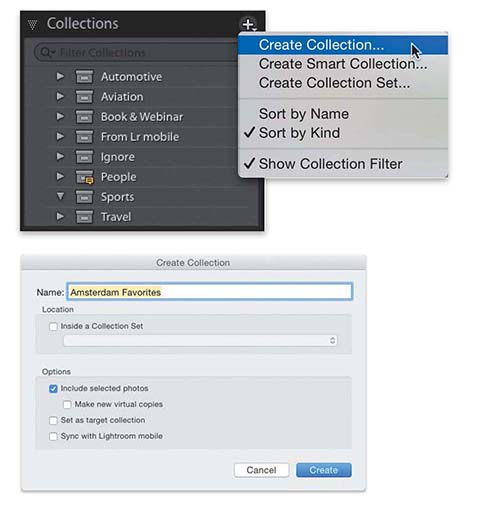
Lightroom calls albums “collections,” and to create a collection of images you like, select the images first (press-and-hold the Command [PC: Ctrl] key, and click on as many images as you’d like), then you can either go over to the Collections panel (in the left side Panels area) and click the + (plus sign) button on the right side of the panel header, and choose Create Collection to bring up the Create Collection dialog (seen above). Or, you can select your images and use the keyboard shortcut Command-N (PC: Ctrl-N) to bring up the same dialog. Once the dialog appears, the Include Selected Photos checkbox is already turned on for you, so all you really have to do is type in a name for this collection and click the Create button, and this new collection will appear (in alphabetical order) over in your Collections panel. To see just the images in that collection, simply click on it.